

Working with this product via an AI agent? Datum publishes a Networks skill that teaches agents to create and manage networks with
datumctl network. Datum MCP gives agents live access through its network and vpc toolsets.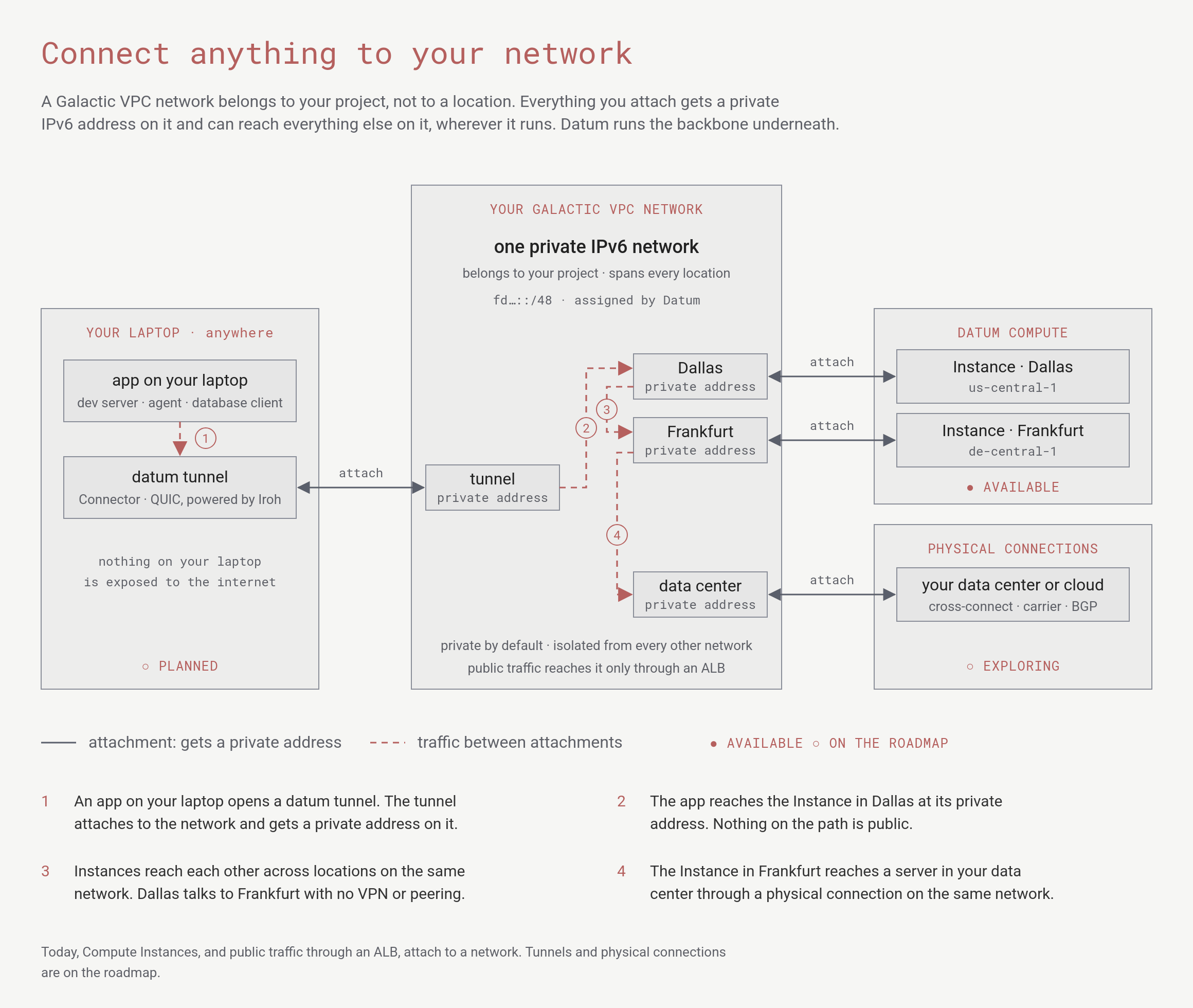
One network, many attachments. Compute Instances attach today. Tunnels from your laptop and physical connections are on the roadmap.
gVPC is in preview, and the
networking.datumapis.com/v1alpha API can change.How it works
A network belongs to a project, not to a location. You attach Compute workloads to a network, and every Instance of those workloads gets a private IPv6 address on it, in whichever location the Instance runs. Networks are isolated from each other, and public traffic reaches Instances only through Datum’s Application Load Balancer. For details, see Networks overview.Features
gVPC provides the following features:- One network across locations: A network is a single project-wide resource. Every workload that names it, in any location, attaches to the same network, and each Instance gets a private IPv6 address on it.
- Automatic addressing: Datum assigns address space to each network and an address to each Instance. You don’t plan subnets.
- Stable addresses when you need them: Instances keep their addresses when Datum replaces them, and a workload can keep addresses reserved when it scales down.
- Network services: A network service gives a workload’s Instances a stable name and named ports, so a load balancer can send traffic to them.
- Declarative: Networks are Kubernetes-style resources that you manage with the
datumctl networkplugin, manifests, or GitOps tooling.
What’s next
Networks
How networks relate to projects, locations, and workloads.
Configuration
Create a network and attach a workload to it.
Network services
Give a workload a stable name and named ports for a load balancer.
Operations
Inspect, change, and delete networks and network services with the
network plugin.Limitations and roadmap
Review networking limitations and planned capabilities.
Deploy an app
Deploy a workload that attaches to the
default network.